
If you sell on eBay, negative feedback can feel like a direct hit to your business. Buyers see it before they buy. It can lower trust fast. That is why many sellers search for how to remove negative feedback on eBay as soon as a bad comment appears.
The first thing to know is this: not every negative comment can be removed. eBay allows honest feedback, but it says it does not allow feedback that is harmful, inappropriate, or irrelevant. It also says it removes feedback only when there is factual evidence to support removal.
That means sellers usually have three options. They can ask eBay for eBay feedback removal if the comment breaks policy. They can send an eBay feedback revision request if they fix the buyer’s problem. Or they can learn how to respond to negative feedback on eBay if the comment is likely to stay.
Can you remove negative feedback on eBay?
Yes, sometimes. eBay says it removes feedback that is harmful, inappropriate, or irrelevant. It also gives specific examples of feedback that may be removed, such as threats, offensive content, irrelevant comments and cases where the comment contradicts the rating.
So the real question is not just how to remove negative feedback on eBay. The real question is whether the feedback actually qualifies for removal under eBay policy.
When eBay Feedback Removal May Be Possible
A seller has a stronger case for eBay feedback removal when the comment clearly breaks policy. eBay’s policy pages also cover feedback extortion and feedback manipulation. These are important because they can also support a removal request when the buyer is using feedback unfairly.
Feedback That Breaks eBay Policy
eBay may review feedback for removal when it includes:
- threats or intimidation
- personal information
- irrelevant comments
- comments meant for the wrong seller or item
- contradictory comment and rating combinations
This is the strongest type of removal case because it is directly tied to policy.
Seller Protection Situations Where Feedback May Be Removed
eBay also says some neutral or negative feedback can be removed in seller-protection situations.
These may include cases where:
- the buyer asked to cancel after committing to buy
- the buyer did not pay
- the issue was already disclosed in the listing
- the buyer asked for an address change after payment
- tracking shows delivery expectations were met
- customs charges or tax issues were outside the seller’s control
These cases are different from abusive or irrelevant feedback. Here, the comment may be removed because the seller met their obligations and the issue was outside their control.
Expanded Feedback Removal Protections
The UK Seller Centre also says eBay has expanded some feedback-removal protections for sellers.
This matters because sellers should not assume removal only applies to abusive comments. In some cases, eBay may also remove neutral or negative feedback when the seller followed policy and the problem was caused by the buyer, delivery conditions, or other factors outside the seller’s control.
For example, eBay says feedback may be removable when a buyer asks to cancel an order after placing it and the seller declines the request, because the seller is not obliged to accept a cancellation. The UK Seller Centre gives the example of a buyer purchasing golf balls, then asking to cancel because they found a cheaper set elsewhere. If the seller declines and the buyer leave negative feedback, eBay says that feedback is removable.
When eBay usually will not remove negative feedback
This is where many sellers get stuck. eBay will not usually remove feedback just because it feels unfair or harsh. If a buyer had a genuine bad experience and their comment is relevant and allowed, the feedback may stay. eBay’s policy is about whether the content breaks the rules, not whether the seller agrees with the buyer’s opinion.
That is why a weak request like “this buyer is unreasonable” often fails. A stronger request connects the comment to a specific policy issue.
How to ask eBay to remove negative feedback
If you want to know how to ask eBay to remove negative feedback, start with evidence.
First, review the comment against eBay policy. Check whether it contains abusive language, personal information, irrelevant claims, or a complaint about something already disclosed in the listing. Then check your order records, tracking, messages, and case history.
Seller Help can be used to request feedback removals, and sellers who have listed or sold in the past 120 days can access it. eBay’s feedback policy also says sellers should contact Seller Help within 90 days of the transaction if they believe the feedback goes against policy. If the feedback qualifies, eBay says it emails the seller and removes the feedback within 24 hours.
The best removal requests are short and factual. Do not write an emotional complaint. Write a policy-based request. For example:
“Hello, I am requesting a review of this feedback because it appears to go against eBay feedback policy. The comment includes personal information / is unrelated to the transaction / conflicts with what was clearly disclosed in the listing. Please review it for removal.”
That is much stronger than simply saying the review is unfair.
What is an eBay feedback revision request?
An eBay feedback revision request is different from removal.
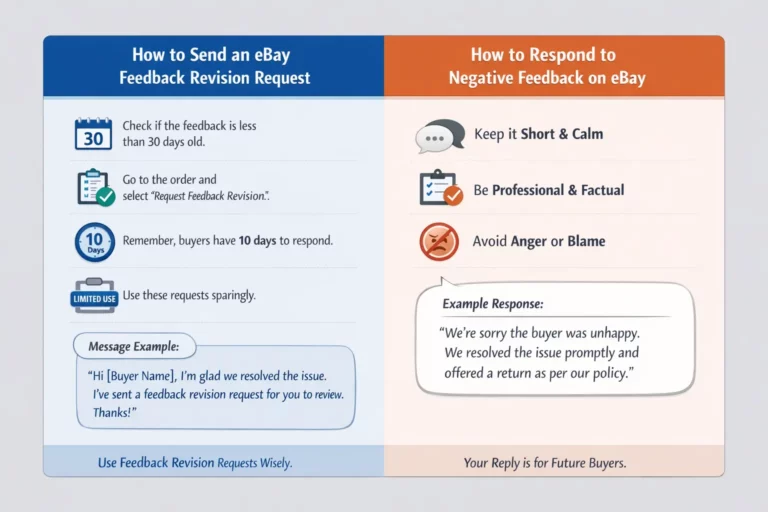
Removal happens when eBay reviews the comment and decides it qualifies under policy. A revision request happens when the seller resolves the issue and asks the buyer to reconsider the feedback they left. eBay’s seller help page says that if feedback is less than 30 days old, sellers can ask the buyer to reconsider it. Buyers then have 10 days to accept or decline the request. eBay also says sellers can make 5 feedback revision requests per calendar year, plus 5 more for every 1,000 feedback ratings received during the year.
eBay’s buyer help page also says buyers cannot freely edit or delete feedback after leaving it unless the seller sends a feedback revision request.
When an eBay feedback revision request is the better option
An eBay feedback revision request is usually the best choice when the buyer had a real problem and you fixed it.
For example, this may work if:
- the item arrived with an issue and you sent a replacement
- the buyer was unhappy and you offered a refund
- there was a misunderstanding and you resolved it quickly
- the buyer calmed down after you communicated properly
Sellers should first try to resolve the specific issue by contacting the buyer. If the issue is resolved, the seller can then ask the buyer whether they will revise their original rating and comment.
That is why the order matters. Solve first. Request revision second.
How to Send an eBay Feedback Revision Request
If the feedback is less than 30 days old, you can ask the buyer to reconsider it. Before you send the request, make sure the issue has actually been resolved. A revision request works best when the buyer is now satisfied and feels the seller handled the problem fairly.
A simple message to the buyer can say:
Hi [Buyer Name], I’m sorry there was a problem with your order. I’m glad we were able to resolve it. If you feel the issue has now been handled fairly, I’ve sent a feedback revision request through eBay for you to review.
This is better because it is polite, clear, and does not pressure the buyer.
How to Respond to Negative Feedback on eBay
Sometimes the feedback will stay. That is when you need to know how to respond to negative feedback on eBay.
eBay says sellers can reply once to a feedback comment, and they cannot edit or retract that reply later. eBay also recommends that sellers reply thoughtfully to negative or neutral feedback because it shows they care about the buyer’s experience.
A good public response should be short, calm, factual, and professional. It should not sound angry, sarcastic, or defensive. Your reply is not really for the unhappy buyer. It is for future buyers reading your feedback profile.
Why this matters for your business
Negative feedback affects trust. eBay’s feedback profile guidance says feedback information helps users buy and sell with confidence. That means feedback is part of how buyers judge your reliability before they purchase.
That is why sellers should not treat this as only a customer-service problem. It is also a conversion problem. One unresolved negative comment can affect future sales if buyers think the seller ignores issues.
The long-term solution is better listings
The truth is that many feedback problems begin before the order is even placed. They start with poor titles, thin descriptions, missing item specifics, or weak pricing decisions. When buyer expectations are unclear, complaints rise.
That is where Prolisto comes to rescue. Prolisto Lite tool lets sellers upload a product image and generate eBay-compliant titles, optimized specifics, and SEO-friendly descriptions in seconds. Prolisto also offers a free eBay Profit Calculator to help sellers understand costs and margins before listing.
This matters because better listings can reduce confusion. Clearer listings often mean fewer disputes, fewer returns, and fewer reasons for buyers to leave negative feedback.
A simple action plan for sellers
When negative feedback appears, do not panic.
- Read the comment carefully. Compare it with eBay policy. If it looks harmful, irrelevant, abusive or contradictory use Seller Help and ask for review.
- If the buyer had a genuine issue and you can fix it, resolve the problem first and then send an eBay feedback revision request.
- If the feedback is likely to remain, post a calm public reply that shows future buyers you acted professionally.
- Then look at the root cause. Improve your titles. Improve your descriptions.
- Make your pricing and offer clearer.
Final thoughts
Negative feedback on eBay is not always removable, but sellers do have options. The best approach is to act quickly, stay professional, and focus on the real cause of the problem.
FAQs
How to remove negative feedback on eBay?
You can remove negative feedback on eBay only in some cases. If the feedback breaks eBay policy, you can ask eBay to review it. If the buyer’s issue was resolved, you can ask them to revise it.
What is eBay feedback removal?
eBay feedback removal is when eBay reviews a comment and removes it because it qualifies under policy. This usually applies to harmful, irrelevant, or policy-breaking feedback.
How to respond to negative feedback on eBay?
Respond in a calm and professional way. Keep your reply short, state the facts, and show that you tried to solve the issue.
How to ask eBay to remove negative feedback?
Check the feedback against eBay policy first. Then contact Seller Help with a short, factual request explaining why the comment should be reviewed for removal.
What is an eBay feedback revision request?
An eBay feedback revision request is the process a seller uses to ask a buyer to change their feedback after the issue has been resolved. This works best when the buyer is now satisfied with the outcome.