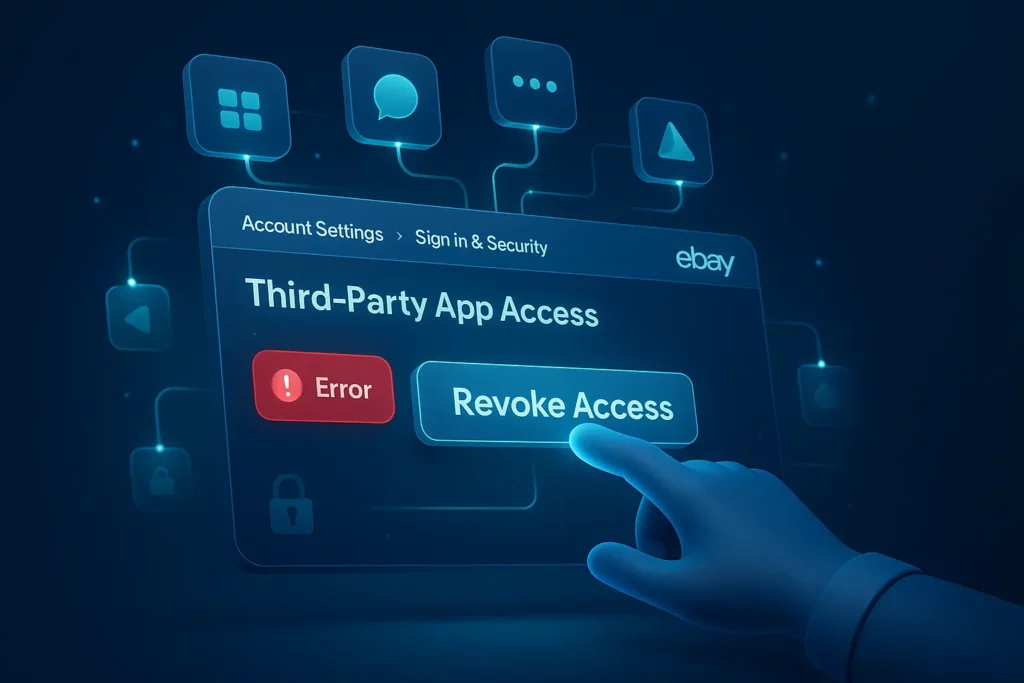
If you’ve been wondering how to revoke third-party authorizations on eBay after the latest layout changes, you’re not alone. Thousands of sellers and buyers have noticed that the familiar “Site Preferences” section has quietly disappeared from their eBay dashboards, and with it, the option to remove or manage app access. This has left many users searching for a way to manage third-party app access and secure their accounts.
In this guide, I’ll Walk you step-by-step through how to find and revoke eBay authorization in the new 2025 layout. I’ll also share personal experience, troubleshooting tips, and crucial security insights that will keep your account safe and future-ready.
Why Revoking Third-Party Access is a Crucial Security Habit
Before jumping into the steps, let’s talk about why this is worth your time. When you grant permission to a third-party app; say a listing manager, an analytics tool, or an auction service, it gains direct access to parts of your eBay account via a secure token. (It’s called an OAuth token – a secure digital key that allows limited data sharing without exposing your password.)
That access can include the ability to:
- List or modify items on your behalf.
- Access personal information such as your feedback, sales history, or messaging data.
- Interact with your account programmatically.
While this is convenient for tools you actively use, it’s also a potential security risk. Old or unmaintained apps might:
- Become security vulnerabilities if the developer stops updating them.
- Be sold to another company with different privacy policies.
- Continue reading your account data long after you stop using the service.
That’s why regularly reviewing your connections and knowing how to remove app access from your eBay account is one of the simplest yet most effective ways to protect your business.
Understanding eBay Third-Party App Access: The Big Move
Let’s clarify what this feature is, and where it went. In the older version of eBay’s account layout, you would find this option under a long, winding path:
My eBay → Account → Site Preferences → Third-Party Authorizations
But in the new eBay account settings for 2025, the same option has moved to a more logical home. You’ll now find it here:
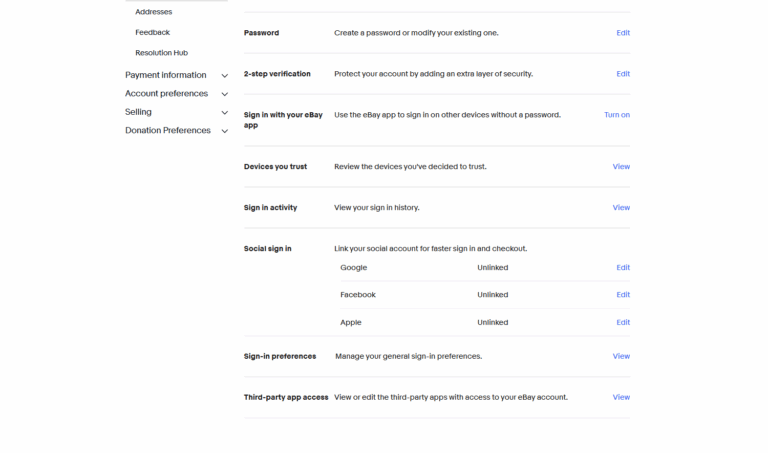
Account Settings → Sign in and Security → Third-Party App Access
You can also get the details by visiting the official eBay Security Centre. This new placement is part of eBay’s broader push to centralize all login, privacy, and permission settings under one unified “Security” area
How to Revoke Third-Party Authorizations on eBay
If you’re trying to revoke eBay authorization or clean up old connections, follow this updated process.
Step 1: Log in to Your eBay Account Settings
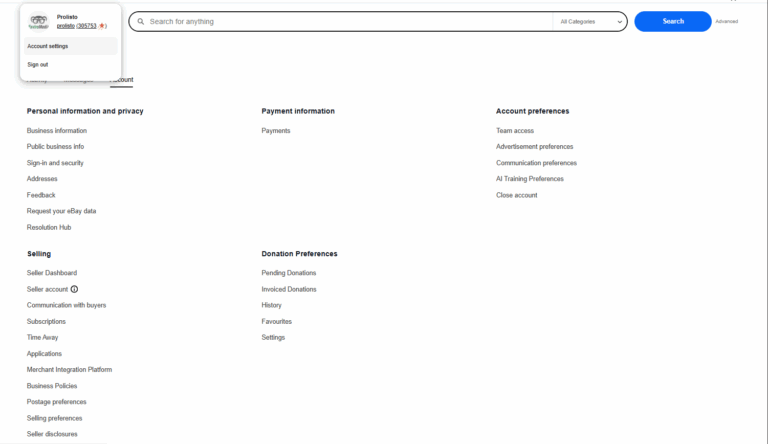
Start by logging into your eBay account. Hover over your name in the top-left corner and click on “Account settings.”
Step 2: Open “Sign In and Security”
On the main Account dashboard, click “Sign In and Security.” This is the modern replacement for the old “Site Preferences” menu and is now the central hub for all core security settings.
Step 3: Scroll to “Third-Party App Access”
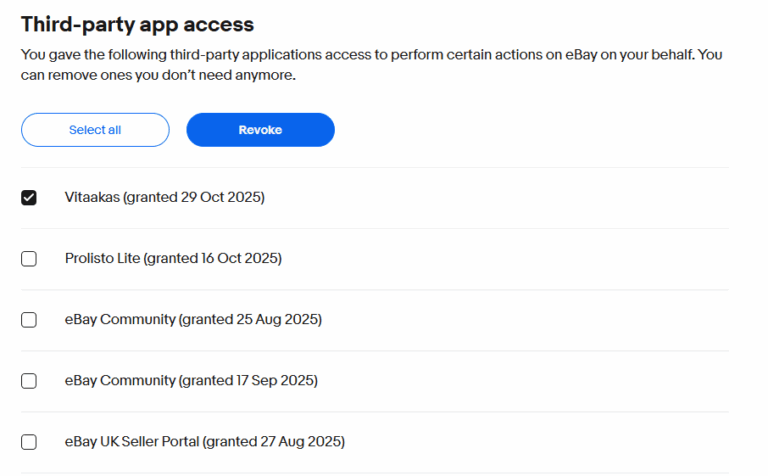
Scroll all the way to the bottom of the page. You’ll find a section titled “Third-Party App Access”’, this is where eBay lists all apps and services that have permission to access your account.
Step 4: View and Revoke Connected Apps
Click “View” to see a detailed list of each connected application, including its name and the date you granted it access. Find the app you no longer use or trust, check the box next to it, and click the button to “Revoke Access.” Confirm when prompted, this immediately and permanently disconnects the app from your account.
Troubleshooting: “I Got a Red Error” When Revoking Access
Some users report seeing a red error message after clicking “Revoke.” This is usually a temporary issue related to your browser or session. Here’s what to try:
- Clear your cache and cookies: Old login tokens can sometimes conflict with eBay’s new session manager.
- Switch browsers: If you’re using Safari or Firefox, try performing the action in Chrome or Edge, as they often work best with eBay’s updated security centre.
- Try incognito/private mode: This simple trick loads the page without any conflicting extensions or cookies.
- Check if the token already expired: Sometimes the app’s access is technically inactive. Refreshing the page may show that it’s already gone.
Beyond Revoking: Best Practices to Manage Third-Party App Access
Managing your eBay third-party app access isn’t a one-time task, it’s good digital hygiene. Here are some habits to adopt.
1. Perform Quarterly Security Reviews
Every three months, take two minutes to check your list of authorized apps. Some tools can renew their access tokens silently. A quick review ensures only the services you actively use stay connected.
2. Only Authorize What You Trust
Before connecting any new app, do your homework. Check the developer’s credibility and carefully review the data access permissions it requests. If an app asks for more access than it reasonably needs to function, think twice before authorizing it.
3. Enable Two-Step Verification (2FA)
You can enable 2FA from the same “Sign In and Security” page. This is your single best defence against unauthorized account access. Even if a third-party service were compromised, 2FA would prevent anyone from logging into your account directly.
4. Update Passwords Periodically
After you revoke eBay authorization for old or unused apps, always update your eBay password. This action invalidates any lingering sessions or hidden tokens that might still exist. It’s a small step with major impact.
Prolisto: A Trusted Third-Party App with Full Revocation Control
When evaluating third-party integrations, Prolisto stands out as an excellent example of transparency and user control.
Prolisto empowers eBay sellers by offering complete flexibility to revoke access at any time directly from their eBay account settings. The app uses secure OAuth-based authorization, meaning you never share your login credentials, and if you decide to disconnect, the access token is immediately invalidated.
For sellers, this provides genuine peace of mind: you can enjoy seamless listing automation, analytics, and order syncing through Prolisto, while still keeping full ownership of your account permissions. This balance between convenience and control makes Prolisto a model for what responsible third-party integrations should look like on eBay.
Best Practices After Removing App Access
- Monitor your account activity -Watch for unusual listings or login notifications.
- Review saved logins on shared devices – Always sign out of eBay on public computers.
- Check connected payment services – If you used PayPal, ensure no lingering permissions exist there too. You can verify this by visiting PayPal’s account connections page.
- Stay updated- Bookmark eBay’s official UK Security Centre to track any interface or policy updates.
- If you sell regularly online, tools like Which? Tech Security Guides can also help you stay informed about emerging risks and data safety best practices.
Final Thoughts: Take Control of Your eBay Account
eBay has modernized its interface, and while that’s a positive step, it has understandably left many long-time users searching for old menu items. The new system makes security simpler: everything is centralized, visual, and easy to manage once you know where to look.
So, take five minutes today to secure your account:
- Visit Account Settings → Sign In and Security
- Review your Third-Party App Access
- Revoke anything you don’t recognize or no longer use
It’s the digital equivalent of changing your locks after moving house – simple, smart, and empowering.
FAQs
Where did “Site Preferences” go on eBay?
eBay has merged most account tools into the modern “Account Settings” dashboard. The functions previously found in “Site Preferences” have been reorganized into more logical sections like “Sign In and Security” and “Selling.”
What happens after I revoke an app’s access?
The app immediately loses its access token. It can no longer pull your data, make changes to listings, or interact with your account in any way. If you want to use that service again in the future, you will need to go through the authorization process from scratch.
How often should I review my connected apps?
A good rule of thumb is to review them at least every 6 months, or immediately after you decide to stop using a service. Frequent checks reduce your account’s exposure to old, forgotten, or potentially insecure integrations.