Managing eBay listings can sometimes feel like juggling multiple balls in the air, especially when you have to keep track of payments, shipping, and returns for each item. In a fast-paced eCommerce landscape, especially in 2025, inefficient processes can lead to missed sales opportunities and frustrated buyers. That’s where eBay business policies come into play. They simplify your workflow by allowing you to create reusable templates for crucial aspects of your listings.
In this blog, we will discuss how to set up eBay business policies effectively to enhance your selling process and improve buyer trust. By the end of this guide, you will know how to create payment, shipping, and return policies that save you time and increase customer satisfaction.
What Are eBay Business Policies?
Definition and Purpose: eBay business policies are a feature that allows sellers to create standardized terms for payments, shipping, and returns that can be applied to multiple listings. This streamlines your work and ensures that your terms are consistent across all items. Instead of inputting the same information each time you create a listing, you can define these terms once and reuse them as needed.
Types of Business Policies:
- Payment Policies: These outline your accepted payment methods and state whether immediate payment is required.
- Shipping Policies: These define how much you charge for shipping, which carriers you use, handling times, and whether you ship internationally.
- Return Policies: These specify whether returns are accepted, the conditions under which they are accepted, and who pays for return shipping
Benefits of Using Business Policies:
Utilising business policies can greatly enhance your eBay selling experience. Here are some of the specific ways they can help:
- Reduced Manual Work: Setting up policies eliminates the need to repeat the same details for each listing.
- Consistency Across Listings: Ensures that your policies are uniform, which can increase buyer confidence and reduce disputes.
- Simplified Management: Having defined policies makes it easier to adjust your terms as needed without having to update every individual listing.
If you’d like a more detailed overview, you can find comprehensive information about eBay business policies on the official e website here: eBay Business Policies .
Why You Should Set Up eBay Policies in 2025
Are you still manually setting the postage, payment, and return details for every single item you list on eBay? If you manage more than a handful of products, this repetitive process can quickly become a major drain on your time and resources. For UK sellers in 2025, efficiency isn’t just a goal; it’s essential for staying competitive.
This is where eBay business policies become your most valuable asset. In this guide, we’ll walk you through exactly how to set up eBay business policies to automate your workflow, ensure consistency, and ultimately build a more professional and profitable online store. The importance of eBay policies can’t be overstated, especially in today’s dynamic online marketplace. Here are several compelling reasons why you should implement them:
Increased Expectations: Today’s consumers expect clear and consistent policies regarding payment, shipping, and returns. Providing this information up front can help you stand out from your competitors.
Updated eBay Requirements: As eBay continues to evolve, maintaining compliance with its guidelines is important for seller integrity and visibility. Having well-defined policies can help you stay compliant with new requirements.
Time-Saving Automation: Automating the application of your policies to new listings can save you a significant amount of time, allowing you to focus more on growing your business.
Impact on Seller Performance: Positive experiences lead to positive feedback. This can improve your seller ratings, ensuring that your listings gain more visibility in searches.
How to Set Up eBay Business Policies (Step-by-Step Guide)
Establishing effective business policies is straightforward. Here’s a detailed walkthrough of the setup process.
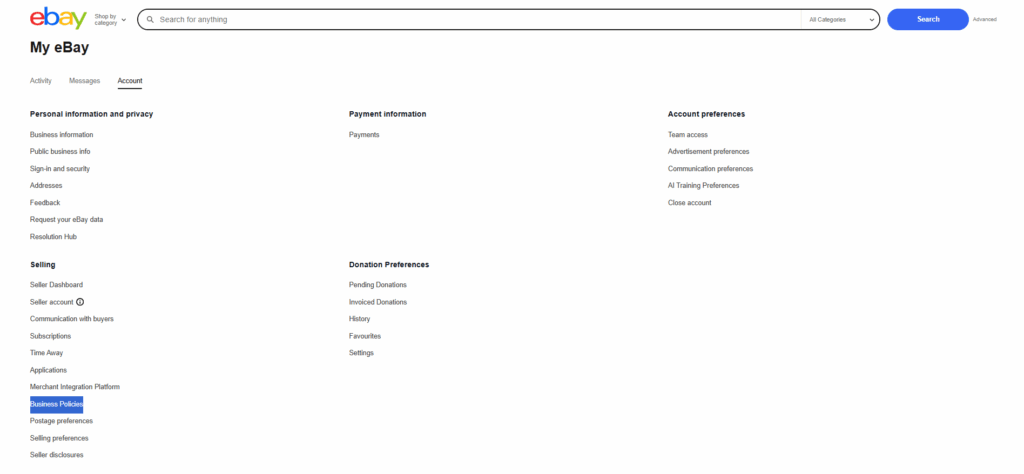
Accessing the Business Policies Feature:
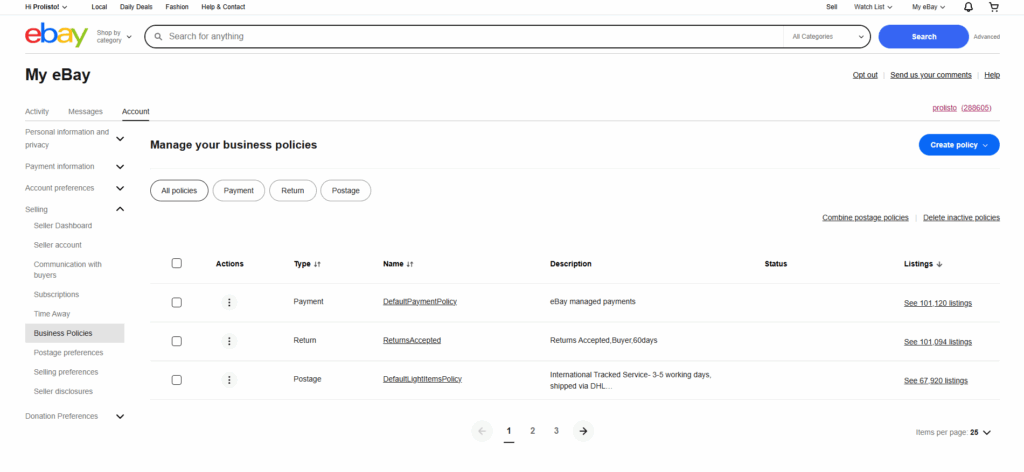
- Log in to your Account: Visit your eBay Seller, Hub.
- Navigate to Account Settings: Hover over the Account tab.
- Select Business Policies: Click on Business Policies from the dropdown menu.
Creating Your Payment Policy:
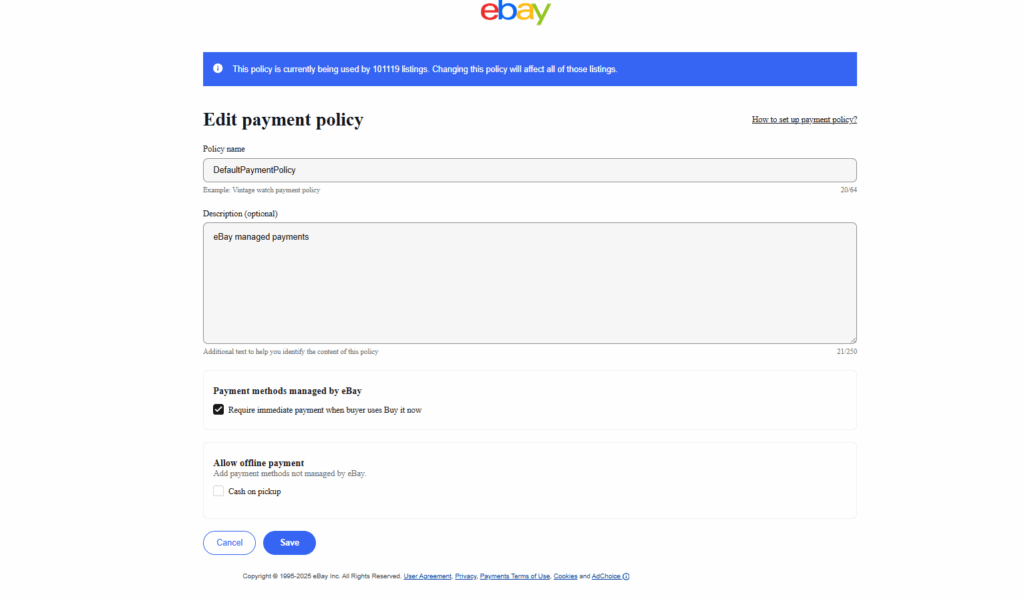
- Click on “Create Policy”: From the dashboard, select Payment.
- Name Your Policy: An example could be “Managed Payments – Immediate Payment Required.”
- Select Accepted Payment Options: Make sure to include all methods you accept, like credit cards, PayPal, etc.
Setting Up Your Shipping Policy:
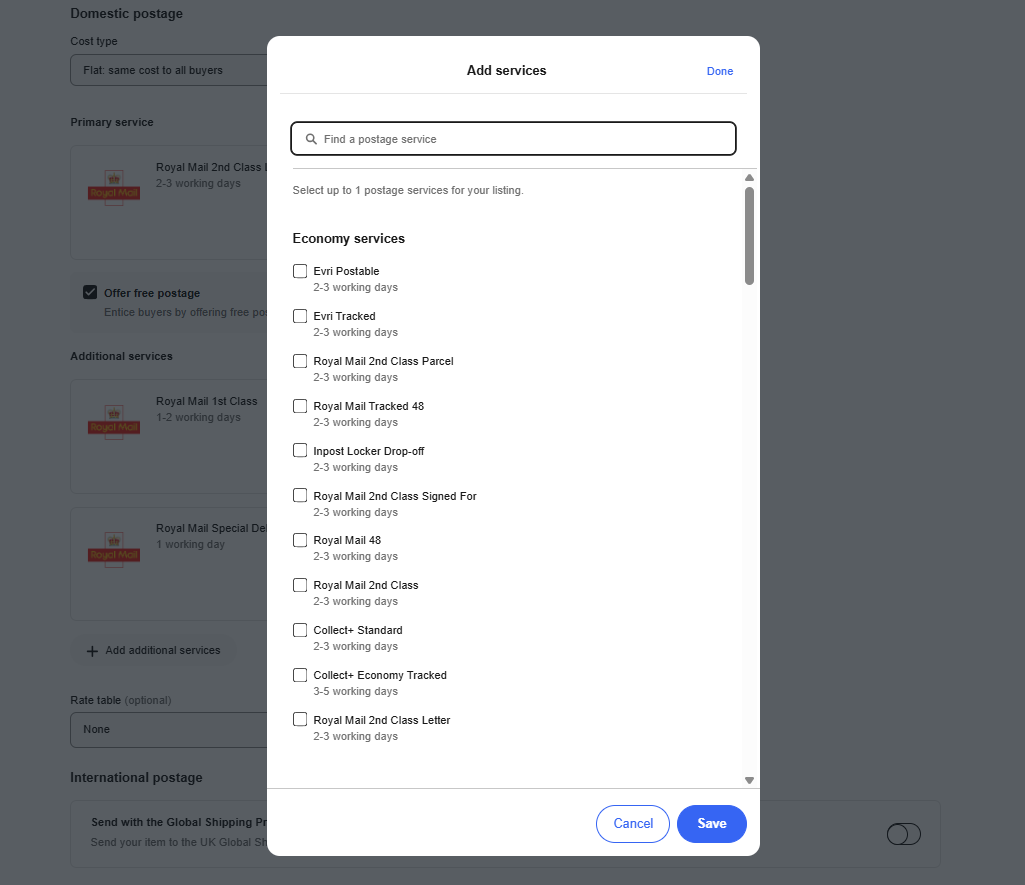
- Create Shipping Policy: Click Create Policy and select Shipping.
- Policy Name: Name it something like “UK Domestic Shipping – Free P&P.”
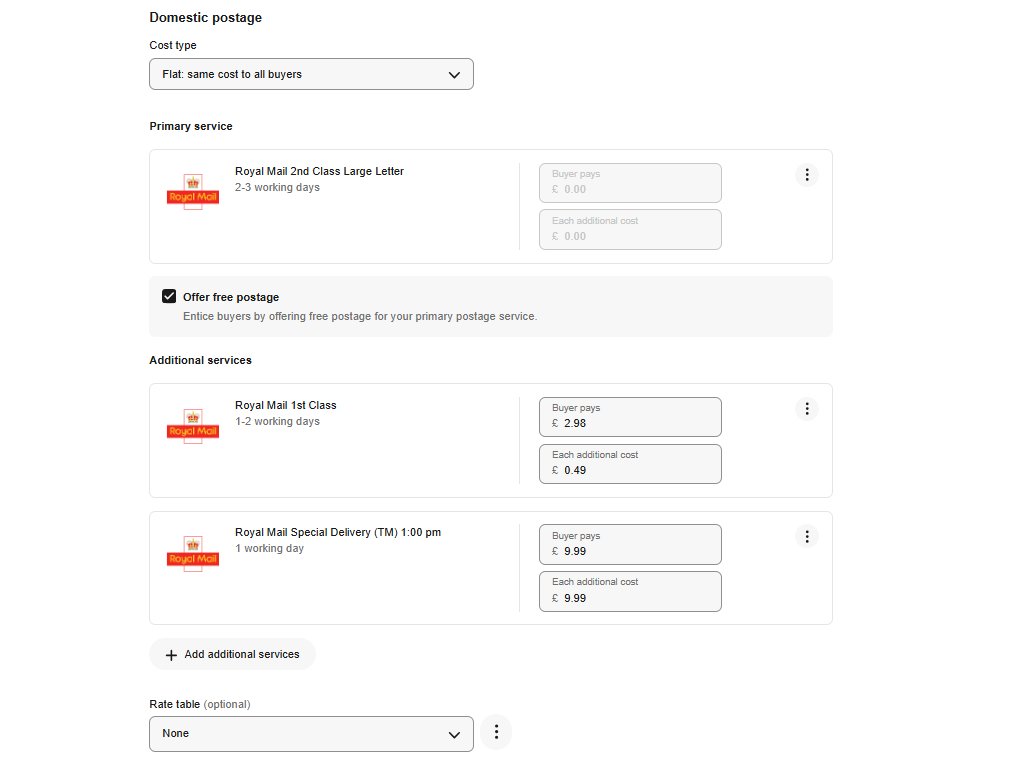
- Define Postage Types: Choose from flat rate or calculated shipping.
- Handling Time: Set a realistic handling time based on your actual dispatch capabilities.
- International Shipping: Decide if you want to sell internationally and include options through eBay’s Global Shipping Programme for ease.
- Consider Free Shipping: Offering free shipping can attract more buyers, so consider this when establishing your costs.
Establishing Your Return Policy:
- Create Return Policy: Click Create Policy and choose Returns.
- Name It: For example, “30-Day Free Returns.”
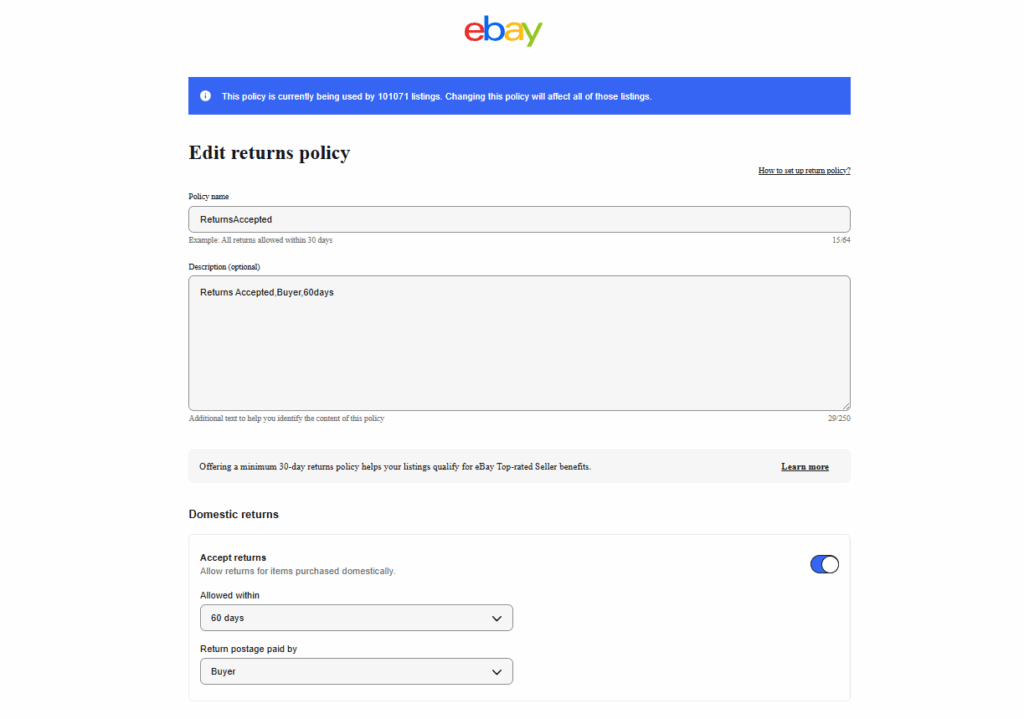
- Set Your Timeframe: Specify how long returns will be accepted (30 days is standard).
- Return Shipping Costs: Determine whether the buyer or you will incur these costs.
- Flexible Return Options: A customer-friendly return policy can encourage more sales as it builds buyer confidence.
Saving and Applying Policies to Listings in Bulk:
Once your policies are set up, you can apply them to multiple listings at once:
- Go to the Active Listings page.
- Select the listings you want to update.
- Apply your payment, shipping, and return policies in one go—saving you considerable time.
Deep Dive into Each Type of eBay Business Policy
eBay Payment Policies
- Payment Options in 2025: As of 2025, eBay manages payments through its own platform, covering credit and debit cards, and various wallets. This simplified method boosts security and can speed up transaction processing.
- Handling Unpaid Items: It’s essential to monitor unpaid items and follow eBay’s processes for resolving disputes. This helps maintain a good seller rating.
- Tips for Quicker Payments: Requiring immediate payment provides security and can reduce your risk of unpaid items, making for a smoother selling experience
eBay Shipping Policies
- Setting Up Shipping Preferences: Clearly outline your postage services. Using trusted carriers, such as Royal Mail or DPD, can improve shipping reliability and customer satisfaction.
- Offering Free vs. Calculated Shipping: Free shipping can significantly increase your visibility in search results, especially if you build those costs into your product pricing.
- International Shipping Policies: Consider offering international shipping. eBay’s Global Shipping Program allows you to ship items worldwide while eBay handles customs.
eBay Return Policies
- Choosing Return Methods: Assessing your returns policy is crucial. Most successful sellers offer a 30-day return policy to increase buyer confidence.
- Efficiently Managing Returns: Use eBay’s built-in tools to handle return requests swiftly, which improves customer satisfaction.
- Updating Policies: Always stay aware of changes in eBay guidelines that affect return policies to maintain compliance and customer trust.
Managing and Updating Your Business Policies
Regularly revisiting your policies is key to staying competitive.
- Why Regular Updates Matter: The eCommerce landscape is fluid. Set a schedule (e.g., quarterly) to review your business policies to ensure they remain relevant and effective.
- Staying Compliant: eBay might update its policies or requirements frequently. Keeping your policies aligned with these updates is essential for protecting your seller standing.
- Monitoring Policy Performance: Track how your policies are performing by checking feedback scores, and adjust accordingly based on customer responses.
Tips and Best Practices for Using eBay Business Policies Effectively
- Consistency Is Key: Be consistent across all your policies to build a solid brand image Buyers appreciate knowing what to expect. Transparency with Buyers: Include a brief explanation of your policies in listings. This proactive approach can prevent disputes and reduce inquiries.
- Leverage Bulk Listing Tools: Use listing tools and eBay’s bulk-editing features to apply your policies swiftly and efficiently, especially as you grow your inventory.
- Competitor Research: Regularly review competitors’ policies to find areas where you can improve your offerings and attract more buyers.
Common Mistakes to Avoid When Using eBay Business Policies
Outdated Policies: Failing to update your lead to discrepancies, which may affect your seller rating negatively. Always keep an eye on changes in shipping rates, payment options, and regulatory requirements.
- Inconsistencies: Ensure all your listings reflect the same policies to avoid confusion among potential buyers.
- Unclear Return Policies: A vague return policy can deter potential buyers. Be clear about whether returns are allowed and under what conditions to enhance buyer confidence.
Conclusion
Mastering your eBay business policies in 2025 is a fundamental step toward streamlining your operations and boosting your store’s success. With clearly defined payment, shipping, and return policies, you can save time, reduce manual work, and create a trustworthy shopping experience for your customers. As you grow your eCommerce business, invest time in developing these policies to ensure they align with your business practices and market conditions. By continually optimizing your policies, you’ll set yourself up for success in the evolving eBay landscape.
Q1: What are eBay business policies, and why are they important?
A: eBay business policies are standardized templates for payments, shipping, and returns that sellers can reuse across listings to save time and ensure consistency. They help simplify listing management, improve buyer trust, and keep your store compliant with eBay’s rules.
Q2: How do I create eBay business policies?
A: To create eBay business policies, log in to your Seller Hub, navigate to Account Settings > Business Policies, and then create separate payment, shipping, and return policies by filling out the required details. Once saved, you can apply these policies to multiple active listings.
Q3: Can I change my eBay business policies after listings are live?
A: Yes, you can update your business policies at any time. Changes will apply to new listings and can be bulk-updated to existing listings for consistent terms. It’s important to regularly review policies to stay compliant and competitive.
Q4: Does offering free shipping improve my eBay listing’s visibility?
A: Yes, eBay often promotes listings that offer free shipping, as buyers frequently filter for such listings. Including free shipping can boost your search rankings and attract more buyers.
Q5: What should I include in my return policy to build buyer confidence?
A: A clear return timeframe (typically 30 days), an explanation of return conditions, and who pays for return shipping. Offering hassle-free and customer-friendly returns can increase sales and positive feedback.
Q6: How does managed payments affect my eBay payment policies?
A: With eBay Managed Payments, eBay processes payments directly, simplifying transactions for sellers. Sellers must specify accepted payment methods within their payment policy but generally benefit from faster and secure payments.
Q7: What are common mistakes to avoid when setting up business policies?
A: Avoid inconsistent policies across listings, outdated terms, and vague return rules. Always keep policies updated and clearly communicated to prevent buyer confusion or disputes.