We’ve all been there. You get a sale, and instead of feeling excited, a little alarm bell goes off in your head. The eBay scam buyers requests are strange, their address looks odd, or the whole situation just doesn’t feel right. Dealing with potential eBay buyer frauds is one of the most stressful parts of running an online business. It can leave you feeling powerless and out of pocket. But you’re not. This guide is here to give you a clear, actionable plan. We’ll walk you through how to spot the red flags of fake buyers on eBay, what to do if you suspect a scam, and exactly how to report a buyer on ebay. We’ll also cover essential safety practices to protect your information and recognise fake communications.
Prevention First: Spotting Red Flags Before You Ship
The best way to deal with a fraudulent buyer is to avoid them in the first place. Scammers often leave clues, but sometimes they are hidden behind a seemingly legitimate profile.
Warning Signs in the Buyer’s Profile and Behavior
- Brand New Accounts: Be cautious with zero-feedback accounts, especially when they purchase expensive items immediately. While everyone starts at zero, a new account making a high-value purchase warrants extra care.
- Unusual Communication: Watch out for buyers who ask you to communicate or take payment outside of eBay’s messaging system. This is a major policy violation and a huge red flag. They might ask for your personal email or phone number to send a fake payment confirmation.
- Suspicious Shipping Requests: A common tactic is asking you to change the delivery address after they’ve paid. The original address is the only one you are protected for under eBay’s Seller Protection. Shipping to a different address can void your protection if they claim the item never arrived.
But What If the Buyer Has Great Feedback? How fake buyers on eBay Use Established Accounts
This is where things get tricky. You check a buyer’s profile, see hundreds of positive feedback ratings, and feel reassured. Then, they pull a scam. Often, this is due to an account takeover. Scammers use “phishing” emails to trick legitimate users into giving up their login details. Once they have control of this established account, they use its good reputation to defraud sellers. This is why you must always judge the transaction by the buyer’s current behavior, not just the account’s history.
A Real-World Example from the eBay Community
Sometimes, the best lessons come from other sellers. In a discussion on the eBay UK Community forum, a seller received an order for a high-value mobile phone from a buyer with zero feedback. Before paying, the buyer asked for the phone’s IMEI number. Experienced sellers immediately advised this was a major red flag. The advice was clear: do not send the number, wait for official payment confirmation within eBay, and be prepared to cancel for non-payment. This is a perfect example of a community spotting a potential scam early.
You Suspect fake buyers on eBay? Your Step-by-Step Action Plan
If you’ve been scammed on eBay by a buyer or a situation feels wrong, it’s crucial to act quickly and methodically.
When Should You Report eBay scam buyers?
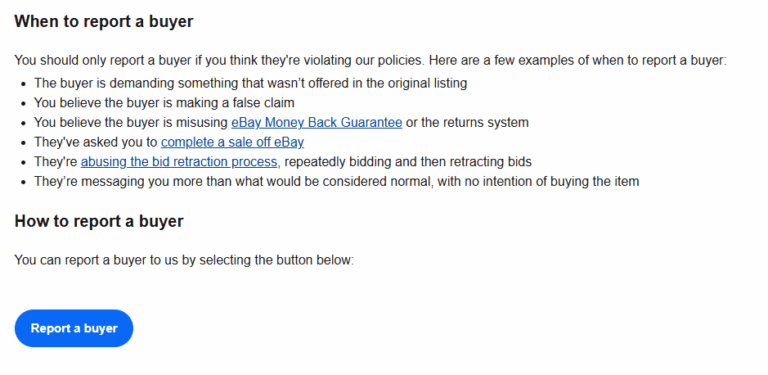
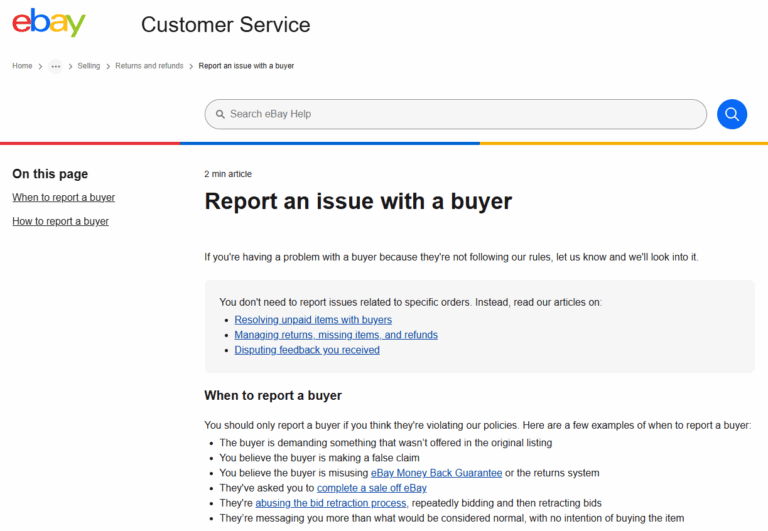
It’s important to report buyers who are clearly breaking the rules. According to eBay’s own policy, you should report a buyer if they:
- Make unreasonable demands not included in the listing.
- Make a false claim, like saying an item wasn’t received when tracking proves delivery.
- Abuse the returns process by sending back a different item or an empty box.
- Ask you to complete a sale outside of eBay.
- Send threatening or abusive messages.
- Bid on items with no intention of paying.
How to Report a Buyer on eBay
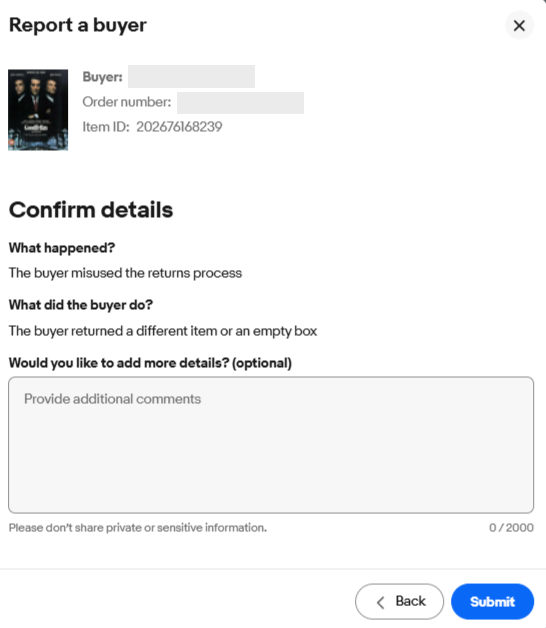
Reporting the buyer is a critical step that flags their account for eBay’s trust and safety team. So how to report eBay scam buyers.
- Go to your “Sold” items in My eBay or the Seller Hub.
- Find the order and from the dropdown menu, select “Report a buyer.”
- You can also go directly to eBay’s Report an issue with a buyer page .
- Choose the reason that best fits your situation.
- Briefly and factually describe what happened. Stick to the facts.
- Submit the report.
Clicking “Submit” sends the information directly to the right department, helping eBay build a case against fraudulent accounts.
Manage the Case Professionally
If the buyer opens an “Item Not Received” case or “Return” request, you must respond within the given timeframe (usually 3 business days).
- For “Item Not Received”: Upload the tracking number showing delivery to the address on the order. This is usually enough to have eBay close the case in your favour.
- For “Item Not as Described” (The return scam): This is tougher. Accept the return. When the package comes back, if it’s the wrong item or an empty box, take photos or a video of you opening it. You can then report the buyer and appeal to eBay with your evidence. You can also deduct up to 50% of refund amount if the item is returned used or damaged.
How Does eBay Verify eBay buyer frauds to Prevent Scams?
It can feel like you’re on your own, but eBay has ongoing systems in place. Verification is a multi-layered process that includes confirming an email address or payment source. Behind the scenes, eBay’s systems monitor for red flags, like dormant accounts suddenly buying expensive items. Your reports are a vital part of this system, providing crucial data that helps eBay’s teams connect the dots and shut down bad actors.
Protecting Your Operations: Key Steps to Prevent Fake buyers on eBay
Protecting your business goes beyond handling individual problem transactions. The best defence against ebay buyer frauds is building a secure foundation for your entire operation. By being proactive, you can make your business a much harder target for scammers.
Your First Line of Defence Against a Suspected eBay Scam Buyers
One of the most underutilised yet powerful tools in a seller’s arsenal is the ability to control who can purchase from you. While eBay’s systems are there for when things go wrong, being proactive is your best defence against repeat issues. Taking a few moments to manage your buyer list can save you significant time, money, and stress down the line.
- Proactively Bar Problematic Buyers-
- Don’t wait for a second bad experience. If you’ve dealt with a buyer who was abusive, attempted a fraudulent return, or made unreasonable demands, you have the right to prevent them from interacting with your business again.
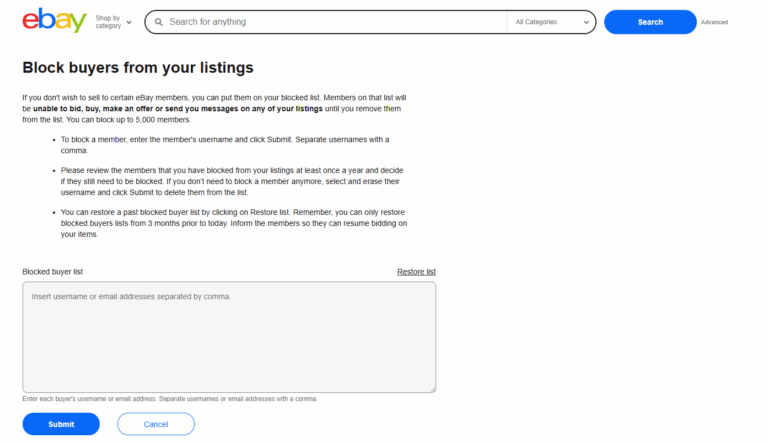
- Navigate to the “Blocked buyer list“ page within your Seller Account settings. Here, you can enter the usernames of individuals you wish to block.
- Once added, they will be completely barred from bidding on your auctions or using “Buy It Now” on any of your listings, effectively closing the door on future disputes with that person. Think of it as essential business security.
- Conduct an Internal Audit for Suspicious Claims-
- When a claim arises that feels suspicious or doesn’t align with the facts, your own sales history is a crucial first stop. Before responding, go to the “Orders” tab in your Seller Hub and search for the buyer’s username.
- A quick check will reveal if you’ve sold to this person before. A pattern of behavior is a major red flag. Did they make a similar claim on a past order? Do they have a history of leaving negative feedback and then asking for a partial refund?
- Discovering a history of problematic transactions provides powerful context. While this internal check won’t automatically resolve the current case, it is invaluable evidence to include when you report the buyer to eBay for abusing its policies, strengthening your position and helping to protect the entire seller community.
Become a Scam Detector: Recognizing fake buyers on ebay
One of the most common ways sellers get trapped by ebay scam buyers starts not on eBay, but in your email inbox. This is called a “phishing” scam. Let’s walk through a classic example to make it perfectly clear.
The Setup: A Step-by-Step Example
- The Bait: You list a valuable item, like a laptop for £500.
- The “Buyer” Appears: A potential buyer sends you a message on eBay. They seem eager, but then they ask, “Can I have your email address? It’s easier for me to send the payment confirmation there.” This is the first red flag. They are trying to move the conversation off eBay.
- The Fake Email Arrives: A few minutes later, you receive an email that looks incredibly official. It has the eBay and PayPal logos, the item details, and your buyer’s name. It says something like: “Congratulations! Your Item Has Sold. You have received a payment of £500.00.”
- The Trick: Here’s the clever part. The email might also say: “For your security, these funds are being held. They will be released into your account as soon as you have shipped the item and provided us with a tracking number.”
This creates a sense of urgency. It tricks you into thinking you must ship the item first to get your money. This is a lie.
How to Know It’s a Fake: The Three Giveaways
Before you rush to the Post, stop and look for these clues:
- The Sender’s Address: Look at the “From” address. A real eBay email comes from a domain like @ebay.co.uk. A fake one will be slightly off, like @ebay-payments-uk.net or @mail-ebay-support.com.
- The Request: The email asks you to take a major action (ship a £500 laptop!) based only on the information in the email itself. A real transaction is always confirmed inside your eBay account.
- The Destination: If you hover your mouse over any links in the email (DO NOT CLICK!), the destination URL that pops up will likely be a strange, non-eBay address.
The Golden Rule: Trust Your eBay Account, Not Your Email Inbox
The safest way to handle this is simple:
- Ignore the email completely. Don’t reply, and don’t click any links.
- Open a new, separate browser tab and manually type in www.ebay.co.uk .
- Log in to your account and check your “Sold” items or “Payments” tab.
If eBay’s official website does not show the order as “Paid” and “Ready to Dispatch,” then you have not been paid. It’s that simple. What you see inside your eBay account is the only truth you should trust.
Your Anti-Scam Checklist: Key Takeaways
If you remember nothing else from this guide, keep these four points in mind to protect yourself.
- Be Proactively Vigilant: Learn to spot the red flags of fake buyers on ebay before you ship. Question unusual requests, scrutinise new accounts on expensive orders, and never, ever complete a sale outside of eBay.
- Track Everything, No Exceptions: Your tracked shipping number is your ironclad proof against the most common scam: the false “Item Not Received” claim. It is the single most important piece of evidence you have when you feel you’ve been eBay scam buyers
- Master the Reporting Process: Don’t just get angry, get even by taking action. Understand how to report a buyer on ebay using the official tools. When you see a violation, use the “ebay report this buyer“ function. This not only helps with your specific case but also helps eBay remove bad actors from the platform.
Conclusion
Dealing with fraudulent buyers is incredibly frustrating, but you have tools and processes to fight back. By staying vigilant, documenting everything, and following eBay’s procedures, you can protect your business. Remember, the vast majority of buyers are honest. Keep refining your safety processes, stay informed, and don’t let the fear of a few bad apples stop you from growing your successful online business.
FAQs
How do you know if a buyer is scamming you?
Look for red flags. The most common signs include a brand new account making a high-value purchase, any request to communicate or take payment outside of eBay, pressure to ship an item urgently before payment is confirmed in your eBay account, or a buyer asking you to change the shipping address after they have already paid. Trust your instincts—if a transaction feels off, it’s worth a closer look.
What to do if a buyer is scamming me on eBay?
Follow a clear, calm process. First, do not ship the item if you haven’t already. Gather all evidence: screenshots of messages, photos of the item, and the order details. Keep all communication strictly on the eBay platform. If they have opened a case, respond professionally with your evidence (like tracking information) within the deadline. Finally, report the buyer to eBay to flag their account.
How do I report a buyer scammer on eBay?
Reporting is straightforward. Go to your “Sold” items in Seller Hub, find the order, click the dropdown menu, and select “Report a buyer.” You can also go directly to eBay’s official “Report an issue with a buyer“ page. Choose the most accurate reason for your report and briefly state the facts. This is the most effective way to alert eBay’s trust and safety team.
Will eBay refund me if I’m scammed?
eBay can refund you through its Seller Protection policy, but you must meet the requirements. For an “Item Not Received” claim, you must provide a tracking number that proves delivery to the address on the order. For scams involving returns (like an empty box), the situation is more complex. You will need to accept the return, then report the buyer and appeal the case with strong evidence (e.g., photos, a video of you opening the return) to get your money back. Protection is not automatic, so documentation is key.
Does eBay refund for fake items returned by a buyer?
Yes, this is a form of return abuse covered by Seller Protection. If a buyer returns a different, fake, or damaged item, you should report them immediately. You can then appeal to eBay. In your appeal, state that the item returned is not the one you sent and provide your evidence. When eBay sides with you, they should credit you for the refund, and you won’t have to pay it back.