
Selling on eBay is competitive. Buyers decide fast. They notice your photos and title first. Then they scan your description to check the details. If the description is messy or hard to read, buyers lose confidence. They may leave your listing or message you with basic questions.
This is common for new sellers. Many descriptions are one long block of text. On a phone, that text is even harder to read. Free eBay description templates solve this problem. They give your listing a clean layout with clear sections, headings, and space. This makes your item easier to understand and helps buyers trust your listing.
You do not need coding. You do not need software. You can use a free tool to build a professional description and paste it into eBay.
Get Started with the: Free ebay Description Builder Tool
Who this is for (and why it matters)
This guide is for eBay sellers who list items manually. It is also for sellers who do not want to learn HTML. It is perfect if you are a new seller. It is also useful if you sell a few items each month.
If any of this sound like you, keep reading:
- You want a simple eBay listing description template
- You want your listings to appear professional and trustworthy
- You want your listing to look better on mobile
- You want fewer buyer messages
- You want fewer returns and disputes
- You want to improve eBay listings without paying for tools
The real pain point: buyers cannot find important details
Most buyers do not read every line. They scan. They look for answers fast. When your description is plain text, buyers often miss key details.
This is what buyers may miss:
- Condition details (scratches, wear, missing parts)
- What is included (charger, box, accessories)
- Size or measurements
- Model number or part number
- Compatibility notes (fits which device, year, version)
- Shipping and return details
When buyers miss details, problems start. They message you. They hesitate. They leave. Or they buy with wrong expectations.
That hurts sellers in three ways.
First, you lose time. You answer the same questions again and again.
Second, you lose sales. Buyers choose a listing that feels clearer and safer. Third, you risk returns. Returns cost money and time.
They also reduce your confidence as a seller. A clear description is not just “nice.” It is a trust signal.
Why structured descriptions perform better than plain text
A structured description is easier to scan. It feels organised. It looks professional. Buyers feel more confident when they see a clean layout.
A good template helps you do these things:
- Show key information at the top
- Use short sections with clear headings
- Use bullet points for important features
- Add a simple table for specifications
- Make the listing easy to read on mobile
This is one of the easiest ways to improve eBay listings. You do not need new photos. You do not need ads. You do not need to reduce your price. You simply make your listing easier to understand.
eBay notes that item descriptions help buyers decide whether to buy and what to expect. Clear, complete details reduce confusion and set the right expectations. For detail information check eBay listing description guidelines.
Prolisto’s Free Tool: a simple eBay HTML template builder
Prolisto offers a Free HTML Description Builder Tool for eBay. It is browser-based. You do not need software. You do not need an account. You do not need coding skills. Think of it as an eBay HTML template builder. You build the layout visually using drag and drop. The tool creates the HTML in the background.
What you can add in the builder
You can add sections like:
- Headings for section titles
- Text blocks for item details
- Bullet lists for features
- Images and image blocks
- Tables for specs
- Two-column layouts (use carefully for mobile)
- Simple FAQ sections
What sellers should know before using the free tool
This tool does not create full eBay listings. It only builds the description area.
Here is what that means in simple terms:
- You still create or edit the listing on eBay
- You copy the HTML from the tool
- You paste it into the eBay description box (HTML view)
- You repeat this one listing at a time
This manual approach is a good fit for small sellers. It gives you control. It also keeps the process simple.
How to use the HTML Description Builder for an eBay listing
The workflow is simple.
First, open the Free HTML Description Builder Tool for eBay. Then build your layout. As you build, use the live preview. This is important. It lets you see how your template looks before you paste it into eBay.
When you are happy, export the HTML. Copy the code. Then open eBay and edit your listing. In the description section, switch to the HTML editor view. Paste your HTML. Save your listing.
Now your description uses a clean layout. It looks structured on desktop and mobile.
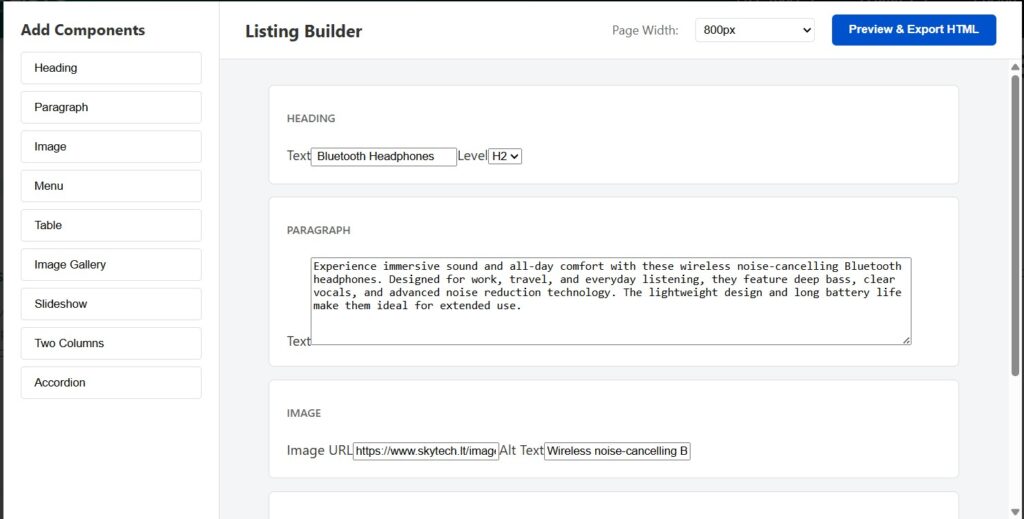
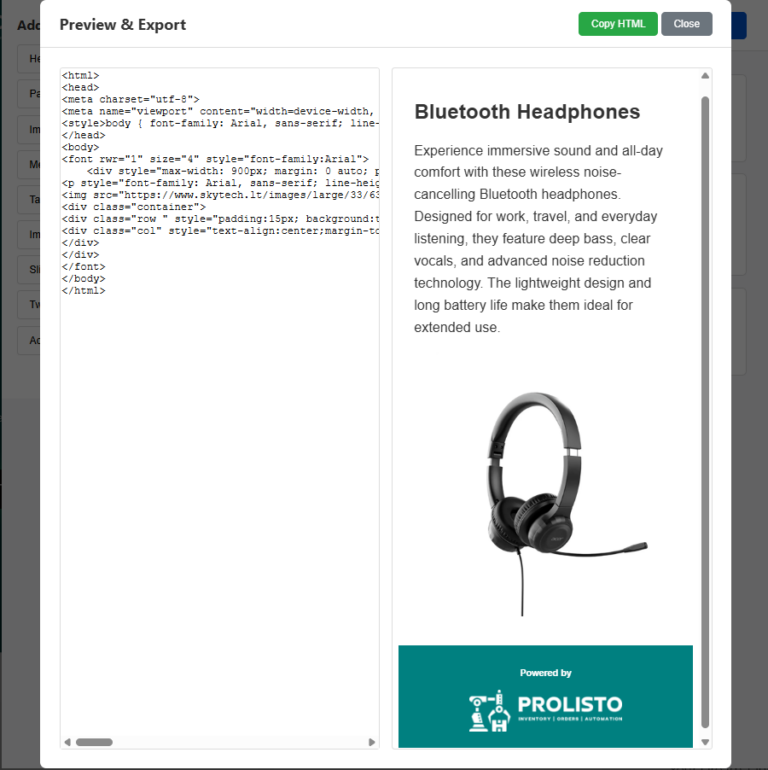
Example – (based on the template shown in the image)
A new seller listed a pair of Bluetooth Headphones on eBay. Their first description was plain text. It looked like one long paragraph on mobile. Buyers kept asking questions like, “Is it wireless?” and “How long does the battery last?”
The seller then used Prolisto’s free eBay HTML template builder. They built a clean layout like the one in the preview. They added a clear title, a short product paragraph, and one main product image.
They used simple wording like this in the description:
After that, the listing looked cleaner and more professional. It was easier to read on a phone. Buyers could understand the product faster. The seller also got fewer repeat questions because the key points were easy to find.
What a good template should include (so buyers stop asking questions)
A template works best when it answers buyer questions before they ask. New sellers should use a simple structure and keep it consistent.
Start with a short summary. Keep it 2 to 4 lines. Mention condition and the main benefit. Then add key features as bullet points. Bullets are easy to scan. Use 5 to 8 bullets.
Next add a “What’s Included” section. This section is important. It reduces messages. Buyers want to know what they will receive. If something is missing, say it clearly.
Then add a “Condition Details” section. This is where trust is built. Be honest. Use short sentences. Mention scratches, marks, wear, or missing parts. Clear condition notes reduce returns.
After that, add “specifics”. If you sell electronics, parts, or items with sizes, include a simple table. Tables help buyers compare quickly. They also look professional.
Finally, add short “shipping and returns notes”. Keep it simple. State dispatch time. State shipping method. State return policy. If you offer returns, say so clearly. If you do not, be clear.
This structure is the base of a strong eBay listing description template.
Best for small-scale and new sellers
Prolisto’s free builder is best for sellers who list manually. It is great if you list a small number of items each month. It is also great if you want a free template you can control.
You can build one template layout once. Then you can reuse it for future listings. You can even save the HTML in a file. Then paste it each time and edit only the product details.
If you later become a high-volume seller, Prolisto also has templates inside the main app. Prolisto offers a fully automated solution to paid users. But the free builder is undoubtedly a great place for you to start.
Conclusion: a better description is a fast seller win
If your descriptions look plain, do not worry. This is common. But it is also easy to fix.
Use free eBay description templates so your listings look clear and professional. Use a clean layout so buyers can scan fast. This helps build trust. It reduces questions. It can reduce returns. It can also improve eBay listings without extra cost.
FAQs
How can better descriptions improve eBay listings?
A clear layout builds trust. Buyers find important details faster. They ask fewer questions. This can reduce returns and help you sell with more confidence.
What should an eBay listing description template include?
It should include a short summary at the top. Add bullet points for key features. Add “What’s included” and “Condition details.” Add specs or measurements and a short shipping note.
Can I use an eBay HTML description template without coding?
Yes. You can use a ready template and edit the text. You can also use Prolisto’s Free ebay Description Builder Tool . That generates the HTML for you. Then you can copy and paste it into eBay.
What are the best free eBay description templates for new sellers?
The best templates are simple and clear. They use short sections and headings. They include key features, what’s included, condition, and shipping. This helps buyers understand the item fast.
How does an eBay HTML template builder help sellers?
It lets you build a clean layout using drag and drop. It creates the HTML in the background. You preview the design, then copy the code. You paste it into the eBay description box.