eBay Estimated Delivery Date at Christmas: The Settings That Decide What Buyers See
Author: Prolisto Team · Published: · 8 min read
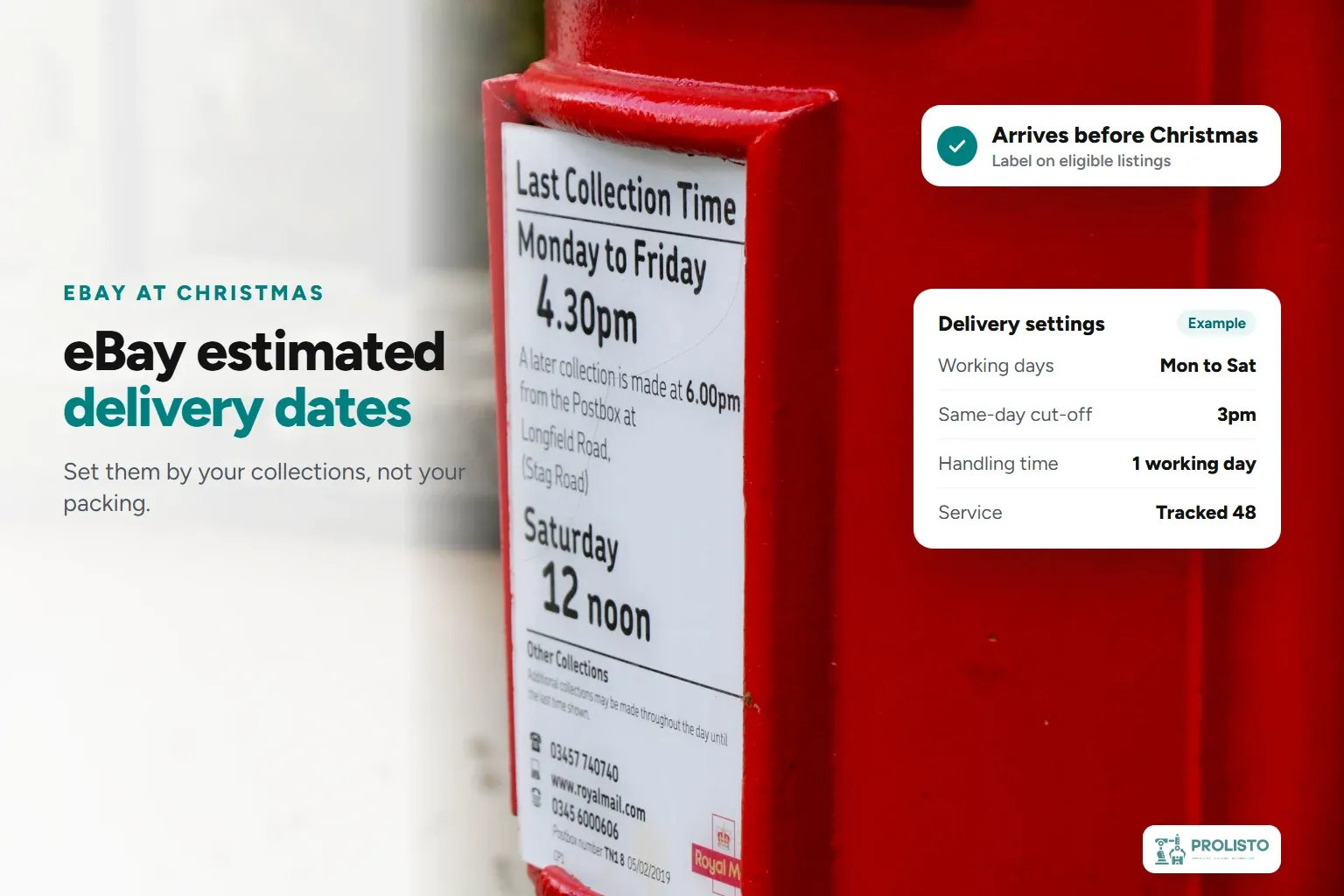
The eBay estimated delivery date on your listing isn't a date you type in. eBay works it out from settings in your account: your working days, your same-day cut-off, your handling time, where the item is, and the delivery service. At Christmas that date matters more than usual, because last-minute buyers choose by it. In December, eBay shows an "Arrives before Christmas" label on listings whose estimated delivery date falls before Christmas, and its peak season guide says this badging helps buyers find faster items.
Get the settings wrong one way and eBay promises dates you can't meet, which turn into late deliveries and "item not received" cases. Get them wrong the other way and your listings look slower than they are, just when buyers are choosing between you and the next seller. eBay's own delivery tips for Christmas list what to check. This guide goes through each setting with what our clients actually do, and when eBay's estimate can be wrong.
How does eBay calculate the estimated delivery date?
eBay's help page for sellers says the date is based on your handling time and the delivery services you offer, along with carrier performance, the location of your item, and the buyer's address. The calculation is dynamic, and eBay may add time when delivery networks are busy, peak season included.
Two rules shape everything else:
- Only your working days count. eBay uses the working days you've selected when it calculates the date. The default is Monday to Friday.
- Handling time ends with the carrier's scan. With one working day's handling, an order paid on Monday has to be dispatched and scanned by the carrier by 11:59pm on Tuesday.
| Setting | Where you change it | What it does to the date |
|---|---|---|
| Working days | Working days and cut-off times | Days eBay counts for dispatch |
| Same-day cut-off | Working days and cut-off times | Orders before it are due out the same day |
| Handling time | The listing, or its postage policy | Days you have to hand the parcel to the carrier |
| Delivery service | The listing, or its postage policy | The transit time eBay adds |
| Item location | The listing | Where the parcel starts, and which bank holidays apply |
Working days: set them by collections, not by packing
Our clients dispatch six days a week at peak. Most also process orders on the seventh day, Sunday, but there's usually no courier collection, so those parcels don't move until Monday.
That's the difference that matters to eBay. It checks your dispatch against the carrier's scan, not against when you packed the parcel. If Sunday is set as a working day and nothing is collected, every Saturday-night order is already a day behind the date eBay promised. If your carrier collects on Saturday and Saturday isn't set as a working day, your listings show a slower date than you can actually deliver.
So set your working days to match the days a carrier collects or scans your parcels. If you take parcels to a post office or drop-off point yourself, the days you can do that count too.
Same-day cut-off: eBay recommends 2pm or later
eBay recommends setting your same-day cut-off no earlier than 2pm, to give buyers time to order. Our clients usually set 3pm. Two details catch sellers out:
- The cut-off only applies to listings with same-day handling. Setting a time doesn't switch same-day dispatch on.
- A day without same-day dispatch should say so. If you don't offer it on a working day, choose "Not offered" for that day.
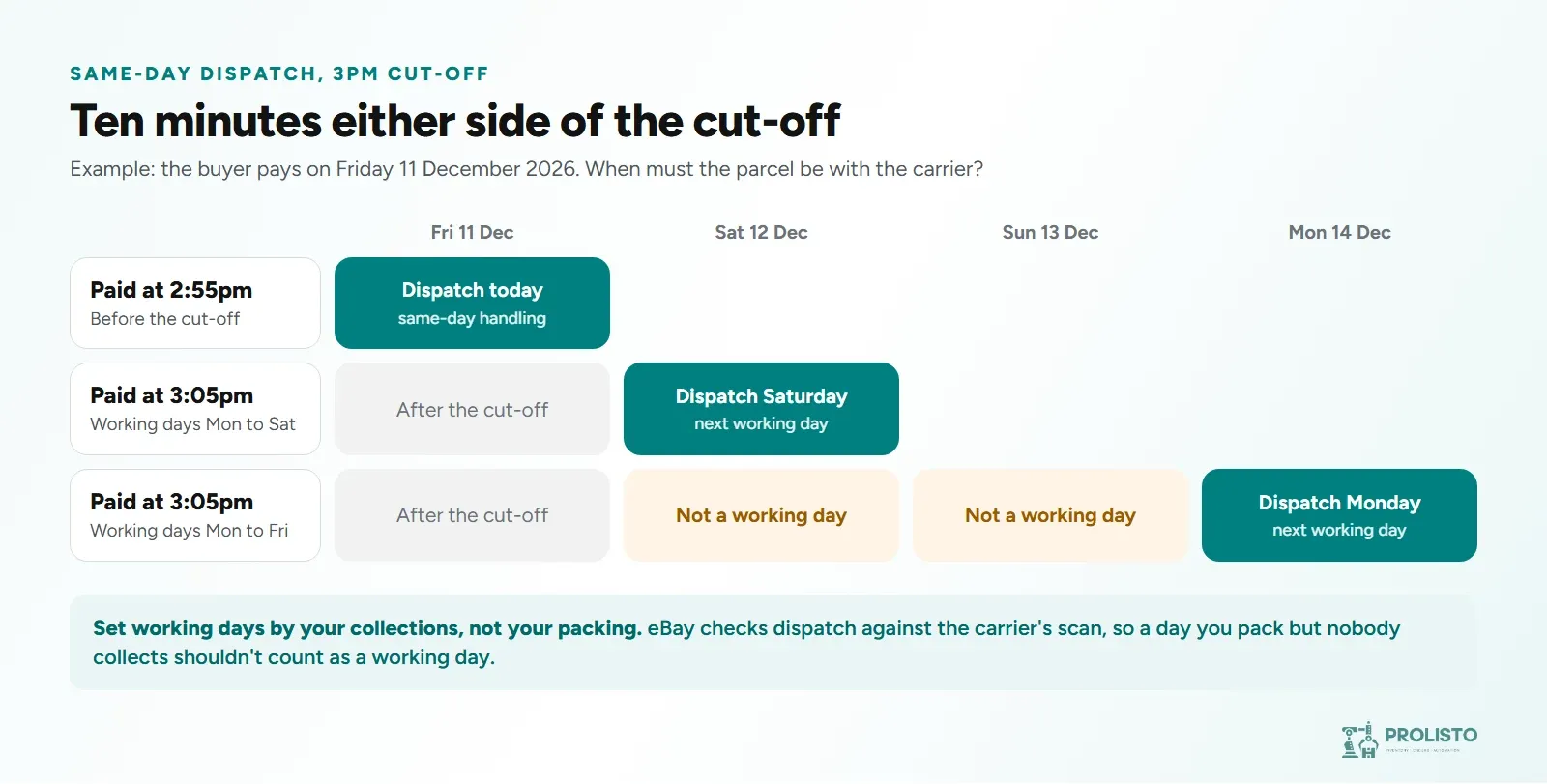
To set yours, work back from the time your carrier collects. Take off the time it takes to pick, pack and label the last orders in, and that's your cut-off. If December volumes mean the last hour's orders take longer, move the cut-off earlier rather than missing collections.
Handling time and postage policies: change them on eBay, then check your automations
eBay recommends a handling time of no more than one working day, and says shorter is better only if you can reliably meet it. Its Christmas advice is the same in plainer words: only offer delivery commitments you can meet consistently during the busy period.
Handling time and delivery services live on eBay, either on each listing or in your postage policies. If you use business policies, changing one postage policy updates every listing that uses it, which is the fastest way to add a day to untracked services in December. Our guide to Christmas posting dates explains when to make that change and when to stop offering slower services altogether.
There's a second half that's easy to forget. If your listing or shipping software chooses the service for each order automatically, those rules have to send the service the buyer paid for. A buyer who chose a tracked 24-hour service at checkout was shown a delivery date based on it, so a rule that sends the parcel by a cheaper 48-hour service breaks that promise. Whenever you change postage policies on eBay, check your automation rules on the same day.
Generic services like "Other courier": when eBay's estimate is wrong
If the service you use isn't on eBay's list, you can choose a generic one, such as "Other courier 3 days". In our clients' experience, eBay sometimes calculates the wrong delivery date for generic courier services. Not every time, but often enough to plan for. eBay can't see which carrier you actually use, so it has less to go on.
eBay's own advice is to state the delivery service you're using, so it can give the most accurate estimate. That gives you two things to do:
- Use the named service whenever eBay lists it. Royal Mail, Evri, DPD, Yodel and others have their own entries.
- Send tracked. eBay's seller standards only count a tracked item as late when the delivery scan is after the latest estimated date and there's no carrier scan within your dispatch time. A scan on time protects you even when eBay's estimate was wrong.
If a parcel does arrive late and the buyer opens a case, our guide to eBay "item not received" claims explains how to respond.
Item location, and bank holidays in Scotland
eBay's item location policy asks for the postcode, city, and country the item will be posted from, and the tracking number must match that location. eBay's Christmas tips ask sellers to check item locations particularly around bank holidays, including those in Scotland that the rest of the UK doesn't have. You can find listings with no postcode in Seller Hub.
Scotland has two bank holidays this winter that England and Wales don't (GOV.UK):
| Date | Scotland | England and Wales |
|---|---|---|
| Monday 30 November 2026 | St Andrew's Day (also Cyber Monday) | Normal working day |
| Friday 25 December 2026 | Christmas Day | Christmas Day |
| Monday 28 December 2026 | Boxing Day (substitute day) | Boxing Day (substitute day) |
| Friday 1 January 2027 | New Year's Day | New Year's Day |
| Monday 4 January 2027 | 2nd January (substitute day) | Normal working day |
A bank holiday doesn't mean you can't dispatch. Our clients in Scotland dispatch according to their carriers' schedules, and in their experience Royal Mail collects on St Andrew's Day. Royal Mail hasn't announced its 2027 bank holiday arrangements yet, so check the 4 January holiday nearer the time. Check with each carrier you use, and keep the day as a working day if they collect. With Cyber Monday on St Andrew's Day this year, that one decision covers one of the busiest days of the season.
Time Away and Authenticity Guarantee closures
If you close completely over Christmas, Time Away changes your handling time and estimated delivery dates for you. eBay's Time Away help says it can run for up to 15 days if you still allow sales, or up to 30 days if you pause them, and it takes a few hours to update your listings if you start it today. If you're still dispatching, just more slowly, extend your handling time instead.
If you sell items that go through eBay's Authenticity Guarantee, such as trainers, watches, handbags, or trading cards, eBay says its authentication centres close from 25 to 28 December 2026 and on 1 January 2027. Allow for those days in your handling times and in what you tell buyers.
Your delivery settings checklist for Christmas 2026
| When | What to check |
|---|---|
| Now | Working days match your carrier collections, the same-day cut-off is set, and every listing has a postcode |
| Now | Your automation rules send the service each buyer paid for |
| Before Monday 30 November | Scotland: decide whether St Andrew's Day (Cyber Monday) is a working day |
| Early December | Add handling time to untracked services, and plan when to stop offering them, using the posting dates |
| Before 24 December | Set Time Away if you close, and allow for Authenticity Guarantee closures |
| Before Monday 4 January | Scotland: once your carriers announce their 2027 holiday plans, decide whether the 2 January holiday is a working day |
| Early January | Put handling times, services, and working days back to normal |
For the rest of the season, from Black Friday to the January sales, see our eBay peak season guide.
How Prolisto helps keep the date you promised
Handling times and postage policies stay on eBay, where buyers see them. Prolisto takes care of what happens after the order arrives, so the date eBay showed is the date you meet:
- Send the service the buyer paid for. Courier rules pick the service by size, weight, marketplace, order value and destination postcode. Set them to match the services in your postage policies, and change them on the same day you change your policies. Multi-carrier order fulfilment.
- Get every order out before the collection. Orders are sorted by shelf for one walk round the warehouse, and labels for Royal Mail, DHL, Deutsche Post and Whistl print in one batch.
- Prove you dispatched on time. Tracking goes back to eBay automatically, so the carrier's scan is on the order when it counts.
- Answer "when will it arrive?" quickly. For eBay messages, templates fill in the buyer's name and an estimated delivery date from the tracking. Customer service portal.
If your December dispatch depends on someone remembering to check every order, it's a good time to see how it could run on its own. Book a demo and we'll show you Prolisto with orders like yours.
Run your eBay and Amazon business in one place
Start free trialBy Prolisto Team · Published 4 November 2026
The Prolisto team builds listing, pricing, inventory and fulfilment tools for eBay, Amazon and WooCommerce sellers, and writes about what works on the marketplaces.